01
Start with the basics
(3 topics
)
There are a number of steps you should consider at the very beginning. As essential as good shoes, weather-appropriate clothing, and a map, investing a small amount of time in these basics will set you up for an ultimately faster marathon.
Now, let’s get started with your Research Data Management (RDM)! This can seem daunting at first, especially after looking at various requirements, making initial preparations (chapter 1) and drafting a Data Management Plan (DMP, chapter 2). It may also seem challenging to reconcile the different levels of RDM/DMPs, from local and institutional to national and international. Rather than trying to do everything at once, it is a good idea to first lay out the immediate needs of your RDM infrastructure and start with selected aspects of it. By the end of this exercise, you should be able to state something like: “We are starting with [dataset/project/instrument] because [problem]. Initially, we want to achieve [goal] for [users/scope].”
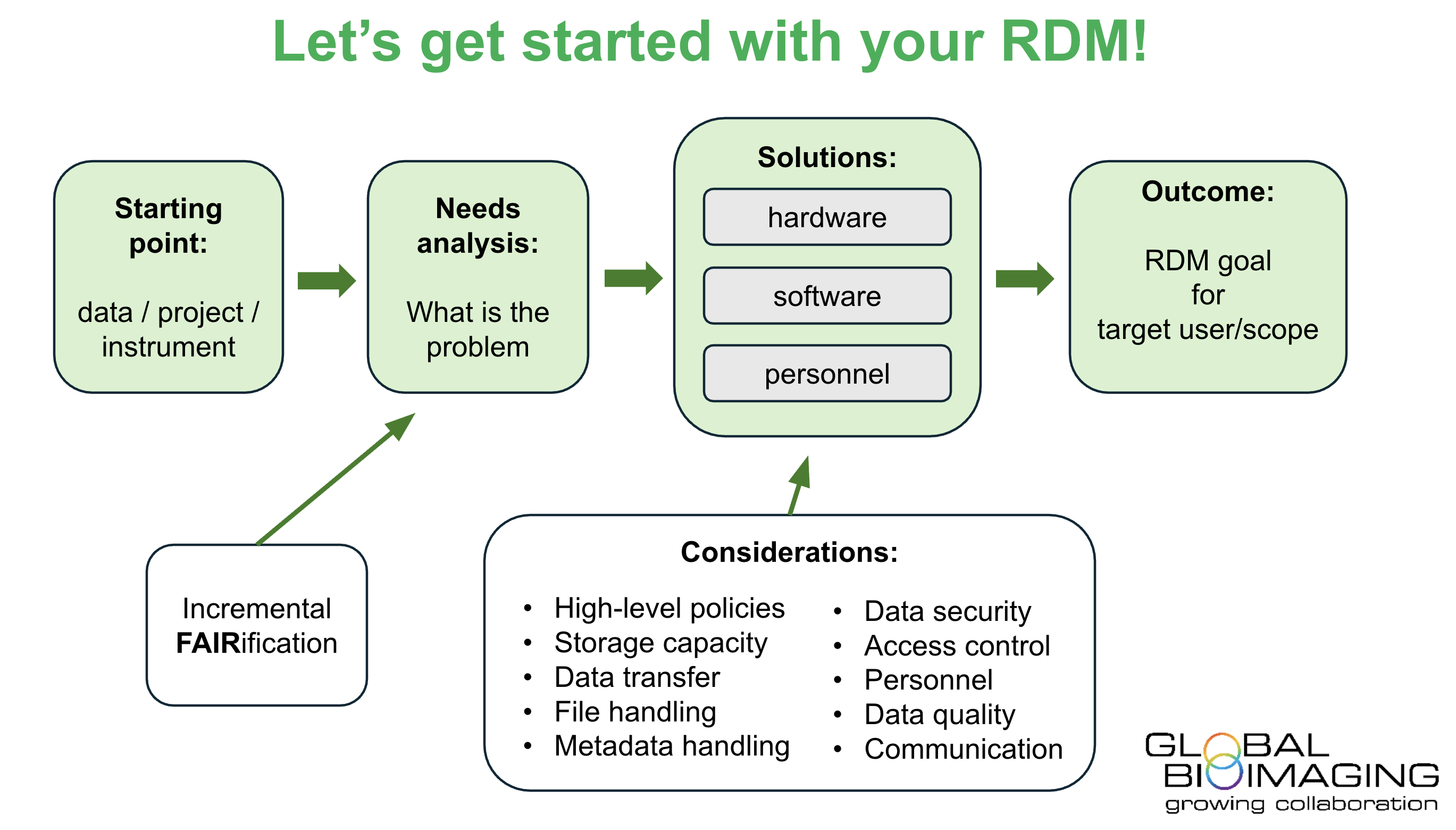
Your first task is to do a needs analysis, something that you will also want to come back to occasionally. What is your most relevant data/project/instrument that needs RDM/DMP? Or perhaps not the most relevant, but one that is sensible to get started with. Rather than attempting to develop a FAIR approach for all your data at once, start with a pilot study, using a smaller dataset or research project as an example. If you work at a core facility, start with the data produced by one microscope that is important, but not the one in heaviest use. It is often sensible to first identify a problem that you (or your users) are currently struggling with. Your needs also depend on the scale you are working with: are you building the RDM for yourself, for a larger group, for an entire imaging facility, or something even larger? Regardless, remember to talk to people at the different levels, ranging from individual users to facilities and institutions, to make sure your needs analysis is apt. The data needs to be FAIR, but what you hope to achieve by this determines how FAIR you need to be. Incrementally making your data FAIRer is a pragmatic approach. Start by taking care that your data is at least Findable within your own research group/institution/core facility and expand from there. At this level you often need to do more yourself, whereas to make data FAIR on a larger scale, there are more existing services available, such as public national/international databases and research infrastructures with helpful data personnel. If you find it challenging to determine your initial needs, get inspired by public recommendations and standards. For example, for bioimaging data, look at recommended metadata guidelines (REMBI, Sarkans et al, 2021). The FAIR cookbook (https://faircookbook.elixir-europe.org/), the ELIXIR RDM kit (https://rdmkit.elixir-europe.org/), and existing FAIRification workflows (Jacobsen https://doi.org/10.1162/dint_a_00028) may also help.
After you have identified the starting point for your RDM, map out the necessary solutions. You will need hardware, software, and personnel. In determining these, you should consider typical RDM factors such as storage capacity, storage times, data transfer, file formats, metadata standards, access control, human curation, backups, and security. The data needs to be stored and shared during the active research stage (warm storage; a lot of this is also needed for visualisation) and published to community repositories or archived afterwards (cold storage). Be aware of the costs involved with both cloud-based and local (e.g. NAS) solutions and calculate capacity needs regularly. There are many existing services for storage, but your organisation may restrict some of them, for instance if they have not been evaluated by the government or your organisation as being trustworthy. Note also hardware needs related to transferring the data sufficiently fast. While the simplest RDM solutions are more hardware-than-software focused (basically a file storage that you use in a drag-and-drop fashion), most well-functioning RDM solutions also need specific software, such as server software optimised for your data type (e.g. open-source OMERO for biological imaging). Specific software solutions may also be needed for handling the large data amounts and enabling their effective processing and analysis, access control, FAIR data sharing, etc. There may also be commercial solutions available for your data types or use cases (stay tuned for Chapter 7 and Chapter 8). While these can be very good in some cases, be aware of limiting yourself to particular ecosystems or manufacturers, depending on your needs for expandability and modifiability, ability to control things, and long-term sustainability. Even the best hardware and software are useless unless you have someone who knows how to put it all together, maintain it, and assist others in how to use it. This aspect of RDM is often underestimated initially; a lot of working hours are needed to set up and maintain hardware and software, do constant software and security updates, fix problems resulting from software or network security and other updates, handle possible user management and accessibility features, etc. Regarding all three - hardware, software and personnel - it is useful to discuss with both your local IT support and possible national IT platforms. For instance, is there technical support available for maintaining a local resource, or the possibility to use larger systems (e.g. national, international)? Is there funding for purchasing RDM services from a third party, or can you apply for such funding as part of your imaging instrument acquisition funding? Contributing to your IT with a small amount of funding (for instance for increased storage capacity) may also help you get more service in return. In any case, be prepared to have a dialogue with the IT providers and funders - long-term negotiations are often needed.
High-level policies. Look at existing high-level DMPs first (e.g. national funding agencies, national RIs). These often also list various practical/lower-level solutions that you can look at next. Don’t worry about meeting all the requirements or ideals immediately, but it’s a good idea to check that your own plans follow the larger high-level outlines and at least don’t contradict them. This will save you time and effort later. The high-level policies are also more difficult to change/negotiate than lower-level policies.
Storage capacity. First consider what you need to store and for how long. For instance, will you cover only new data created, or also legacy datasets that need curation and transformation? Will you cover storage only, or also enable data analysis, in which case you need much more capacity (even several orders of magnitude more) to store also intermediate processing steps and the final results, and your solution needs to be agile enough to handle the analysis processes themselves. Even if you do not support the analysis directly, will you still store the results of analyses done elsewhere? How will the analysis results link to the raw and processed data already stored? You should probably also have some backup practices in place, which easily double or triple your capacity needs, and the backups should also be physically separate. Note that your institution, funder or relevant legislation may affect how long you should store the data. You can start with something relatively simple, such as storing only original data with moderate capacity for some sensible number of years. You can always add more capacity and functionality later, especially if you have adopted modular and easily expandable solutions.
Data transfer. Besides storage, you will need sufficient transfer speeds between the relevant points of your network. These can include, e.g. the data production device, a data analysis facility, a FAIR database, and you and your supervisor. Your IT may be able to help, as may tools such as perfSONAR or Globus. There may also be generic file transfer services available regionally (e.g. Funet FileSender in Finland). You may not need the fastest possible transfer initially, as long as it works. As strange as it may sound in today’s world, it is not always possible to find feasible network-based transfer solutions, especially for large data over great distances. It is still rather common that portable hard drives and similar devices are used even with advanced RDM setups. Doing something like this does not mean that you would be “bad” at RDM; just keep in mind relevant safety aspects (e.g. what happens if the portable drive gets lost or contains a virus).
File handling. Don’t try to cover all your different data types and file formats at once, but choose a relevant starting point, such as image data from a particular device. Do you already have a protocol in place and some conventions when organising the data? You might want to decide upon rules, e.g. folder structure, file naming, obsolete or redundant data deletion. Even such a simple starting point can remarkably influence the overall usability of your data (see also: Step 4: Know your limits).
Metadata handling. International recommendations/standards are a good starting point. Check what metadata comes from the data-producing device and what needs to be separately entered. Your file organisation protocol can cover part of the metadata; some of it is saved with the image data, and some may need separate metadata files (you can make simple templates for the latter). It is useful to consider not only local metadata needs but also what is needed by public repositories for data sharing – aligning with such needs will make things easier in the long run and promote FAIR data sharing.
Data security. Start with non-sensitive rather than sensitive data, if you have a choice. Building RDM for non-sensitive data is simpler and more forgiving. For sensitive data, your environment may already have well-established systems in place, such as at the local hospital. If data security is critical for you, establishing this upfront helps you plan your overall infrastructure. Remember also simple things such as not going for lunch with your office door open or your computer unlocked.
Access control. Depending on your use case, you may need access control to the data. This may be at the level of individual scientists or research groups or at the level of access control to public (sensitive) datasets. When access control is needed, there may be features for this in your server software or other infrastructure, or offered locally, nationally or internationally (e.g. Life Science Login). Access control can be more complicated than it sounds, so perhaps start with something that needs less of it, such as sharing (non-sensitive) data among trustworthy colleagues or public sharing of (non-sensitive) data.
Personnel. If you have the means, consider hiring a data steward. The European Open Science Cloud recommendation is 5 data stewards per 100 researchers. For many, this is not currently achievable, but some form of dedicated support would be a big advantage. If you cannot hire a dedicated data expert, try to find one who can help, for instance, from your IT department or a relevant research infrastructure. Perhaps someone in your team could be or become a part-time data expert? When you hire personnel, for instance, for data analysis, consider also RDM expertise, not just analysis expertise.
Data quality. While this is more up to the data producer and somewhat unrelated to basic RDM, it is overall a very important aspect that can sometimes be useful to consider early on in the RDM context as well. In the age of AI-based and other advanced analysis tools, it is increasingly important to make sure that the original data being analysed is suitable and of sufficient quality, including the metadata. Otherwise, even the most advanced analysis methods produce faulty outputs (garbage in – garbage out). You should also consider if your RDM supports all data produced, including e.g. unsuccessful test runs, data acquired during training, or other erroneous data, or only data that is deemed to be of high enough quality and value.
Communication. Remember to communicate in both directions. Besides consulting experts during planning, as discussed also in previous chapters, remember to communicate your RDM plans back to the relevant experts and organisations, and to your peers/colleagues. This easily gets overlooked, but it is important to make sure others know what you are doing and can accommodate your solutions. For instance, if you have come up with a protocol for file naming and folder structure, make sure others also follow it. This will also help you develop your RDM further.
This project has been made possible in part by a grant from the Chan Zuckerberg Initiative DAF, an advised fund of Silicon Valley Community Foundation.